
Learn how to create and maximize Amazon sponsored ads for success
Amazon sponsored ads explained: Learn how to create, optimize, and maximize their impact to boost your sales and stand out in the marketplace
 Adriana Blazquez 25 min read
Table of contents
Amazon Sponsored Ads are an indispensable tool for sellers aiming to stand out in the competitive marketplace. This guide provides a comprehensive overview of Amazon Sponsored Ads, explaining their types, costs, setup process, optimization strategies, and advanced techniques to ensure your campaigns deliver maximum results.
Introduction to Amazon Sponsored Ads
What are Amazon Sponsored Ads?
Amazon Sponsored Ads are pay-per-click (PPC) advertising solutions designed to help sellers increase product visibility and sales on Amazon’s vast marketplace. These ads appear in high-visibility locations such as search result pages, product detail pages, and even external websites for some ad types. Sellers only incur costs when a potential buyer clicks on their ad, making it a highly efficient advertising method for reaching customers actively searching for products. Key features
-
PPC model: You only pay when a customer clicks on your ad, ensuring cost-efficiency.
-
Multiple Ad formats: Includes Sponsored Products, Sponsored Brands, and Sponsored Display.
-
Targeting flexibility: Allows keyword, product, and audience-based targeting.
-
Integrated reporting tools: Offers performance metrics for optimization and insights.
These ads blend seamlessly with organic content, often marked subtly as “Sponsored,” making them less intrusive while still being effective.
Why are Amazon Sponsored Ads essential for sellers?
Standing out in Amazon’s competitive marketplace is increasingly difficult due to the sheer volume of products and sellers. Sponsored Ads provide sellers with the tools to secure prime placements, improve visibility, and drive conversions. Key reasons why Sponsored Ads are indispensable:
- Increase visibility: With millions of products listed, being prominently displayed in search results is crucial to capture shopper attention.
- Boost sales velocity: Enhanced visibility often leads to increased sales, which in turn boosts organic rankings, creating a positive feedback loop.
- Targeted reach: Ads reach shoppers already in the buying mindset, making them more likely to convert.
- Actionable insights: Detailed analytics provide data on performance, allowing sellers to refine their strategies.
Real-World example: A new kitchenware brand used Sponsored Products to target keywords like “non-stick frying pan.” Within the first 30 days, they experienced a 40% increase in visibility and a 25% growth in sales.
Advantages of using Amazon Sponsored Ads
Using Sponsored Ads offers significant benefits for businesses looking to maximize their potential on Amazon.
-
Cost-effective advertising: The PPC model ensures you only pay for actual engagement (clicks), avoiding unnecessary expenses.
-
Enhanced discoverability: Ads can target high-traffic keywords and strategic placements to increase brand awareness.
-
Control and customization: Sellers can set daily budgets, adjust bids, and choose their targeting methods to align with business goals.
-
Data-driven decision making: Access to reports on impressions, clicks, conversions, and more allows continuous campaign optimization.
-
Support for brand growth: Sponsored Brands and Sponsored Display ads, in particular, help build brand equity by showcasing logos, headlines, and curated product selections.
Pro Tip: Leveraging tools like Amazon’s ad reports or third-party software can further enhance the effectiveness of Sponsored Ads campaigns by identifying high-performing keywords and improving targeting.
How do Amazon Sponsored Ads work?
Amazon Sponsored Ads operate on a PPC auction model where sellers bid on keywords or placements. The ad’s visibility and placement depend on the bid amount and relevance to the shopper’s search query or behavior. Steps in the Sponsored Ads process:
- Keyword auction: Sellers bid on keywords or product placements relevant to their product.
- Ad placement: Amazon evaluates relevance, bid value, and other factors to determine where the ad appears.
- Engagement: When a customer clicks on the ad, they are redirected to the product detail page or Brand Store.
- Costs: Advertisers are charged only when the ad is clicked.
Ad placement locations:
-
Search results pages: Ads can appear at the top, bottom, or within search results.
-
Product detail pages: Often displayed under “Sponsored Products related to this item.”
-
External platforms: Sponsored Display ads can also appear on third-party websites and apps.
Fun Fact: Amazon shoppers are often in the final stages of their purchasing journey, making them more likely to convert compared to other advertising platforms.
Overview of Amazon Sponsored Ads types
Amazon Sponsored Ads are categorized into three primary formats, each catering to specific marketing objectives:
- Sponsored Products:
- Focus: Promotes individual product listings.
- Placement: Search results, product detail pages.
- Ideal for: Sellers aiming to increase sales for specific items.
- Sponsored Brands:
- Focus: Builds brand awareness by showcasing the logo, headline, and multiple products.
- Placement: Prominently displayed at the top of search results.
- Ideal for: Driving traffic to a Brand Store or highlighting product collections.
- Sponsored Display:
- Focus: Targets audiences based on browsing behavior or purchase history.
- Placement: On Amazon (product detail pages, homepage) and third-party platforms.
- Ideal for: Retargeting shoppers and building long-term engagement.
This variety allows sellers to tailor their advertising strategies based on their goals—whether it’s boosting sales, increasing brand visibility, or retargeting audiences.
Types of Amazon Sponsored Ads
Amazon Sponsored Ads come in three main types, each designed to meet specific advertising goals. Below is a detailed breakdown of each type, including their definitions, benefits, best practices, and a real-world success story.
Sponsored Products
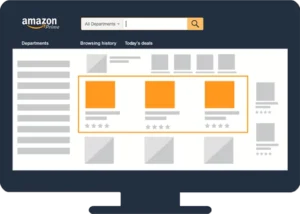
Definition and features Sponsored Products are PPC ads designed to promote individual product listings. These ads appear in search results and on product detail pages, seamlessly blending with organic listings.
-
Targeting Options: Automatic (Amazon determines targeting based on product details) or Manual (sellers choose keywords and bids).
-
Placement: Search results (top, middle, or bottom) and product detail pages.
-
Subtle Presentation: Marked as “Sponsored” but visually similar to organic listings.
 Key benefits
- Increased Product Visibility: Sponsored Products improve the discoverability of individual items.
- Targeted Audience: Enables precise targeting of shoppers actively searching for similar products.
- Ease of Setup: Ideal for beginners due to automatic targeting options.
Best practices
-
Optimize Listings: Use high-quality images, concise titles, and relevant keywords to increase conversion potential.
-
Refine Keywords: Regularly analyze performance data to identify high-performing keywords and adjust bids.
-
Use Negative Keywords: Exclude irrelevant terms to save budget and improve targeting efficiency.
Success example A seller promoting insulated water bottles used Sponsored Products to target keywords like “eco-friendly water bottles.” Within two weeks, they saw a 25% increase in sales and improved their organic ranking for these terms.
Sponsored Brands
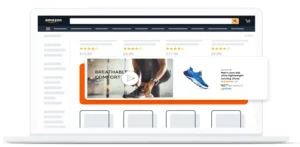
Sponsored Brands are banner-style ads designed to promote a brand and its product lineup. These ads feature a customizable logo, headline, and up to three products, driving traffic to a Brand Store or a specific landing page. Key features
-
Customizable Content: Allows sellers to highlight unique brand elements.
-
Placement: Prominently displayed at the top of search results.
-
Ad Formats: Includes Product Collection, Store Spotlight, and Video.
 Key benefits
- Brand Awareness: Increases visibility for your brand and product portfolio.
- Traffic Generation: Drives shoppers to your Brand Store or curated landing page.
- Showcases Multiple Products: Highlights up to three products in one ad.
Best practices
-
Craft Engaging Headlines: Use persuasive and clear messaging to attract clicks.
-
Leverage Video Ads: Create short, informative videos to capture attention.
-
Highlight Seasonal Campaigns: Use Sponsored Brands to promote seasonal or new product launches.
Success example A fashion retailer used Sponsored Brands to promote a seasonal jacket collection. By driving traffic to their Brand Store, they achieved a 50% increase in visits and a 20% growth in jacket sales.
Sponsored Display
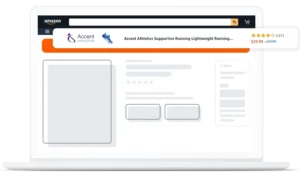
Sponsored Display ads are retargeting and audience-focused ads that appear both on and off Amazon. They use browsing behavior, purchase history, and interests to deliver ads to the right audience. Key features:
-
Audience-Based Targeting: Retarget shoppers who viewed similar products or categories.
-
Wide Reach: Ads appear on Amazon, third-party websites, and apps.
-
Dynamic Content: Ads automatically update with product details and availability.
 Key benefits
- Re-Engage Shoppers: Targets users who didn’t complete a purchase.
- Expand Reach: Appears on external websites and apps, increasing brand visibility.
- Flexible Targeting Options: Combines audience interests and product contextual targeting.
Best practices
-
Focus on Retargeting: Engage shoppers who abandoned their cart or viewed your products.
-
Optimize Creatives: Use high-quality visuals and compelling headlines to boost engagement.
-
Monitor Performance Metrics: Regularly review ROAS and adjust bids accordingly.
Success example An electronics brand used Sponsored Display to retarget customers who viewed their headphones but didn’t purchase. By offering a 10% discount, they achieved a 30% increase in conversions.
Key differences between Sponsored Ads types
| Feature | Sponsored Products | Sponsored Brands | Sponsored Display |
|---|---|---|---|
| Focus | Promoting individual products. | Building brand awareness and showcasing multiple products. | Retargeting shoppers and expanding reach. |
| Placement | Search results, product detail pages. | Top of search results. | Amazon, third-party websites, and apps. |
| Ad format | Individual product ads. | Banner ads featuring a logo, headline, and multiple products. | Dynamic or custom ads with product images, descriptions, and ratings. |
| Targeting options | Keywords (automatic or manual), product targeting. | Keyword-based targeting. | Audience interests, purchase history, and contextual targeting. |
| Ideal for | Increasing product sales and visibility. | Driving traffic to Brand Stores or curated landing pages. | Re-engaging shoppers and reaching new audiences. |
| Best use case | Boosting sales for specific ASINs. | Promoting seasonal collections or brand campaigns. | Retargeting cart abandoners or customers viewing similar products. |
| Budget control | Set daily budgets and bids for individual campaigns. | Allows allocation for brand-specific campaigns. | Flexible bidding models: CPC or vCPM. |
| Advanced features | Negative keywords, detailed performance metrics. | Video ads, new-to-brand metrics. | Audience retargeting, external placements. |
Costs and budgeting in Amazon Sponsored Ads
Effective cost management and budgeting are critical for running successful Amazon Sponsored Ads campaigns. This section delves into the cost structure, influencing factors, and strategies to optimize your advertising spend.
Cost-per-click (CPC) model
Amazon Sponsored Ads operate on a pay-per-click (PPC) basis, meaning advertisers are only charged when a shopper clicks on their ad. Key Highlights:
-
No Upfront Costs: Advertisers are not charged for ad impressions, making the system cost-effective for targeting engaged audiences.
-
Bid-based System: The cost per click is determined through an auction where sellers compete to secure ad placements.
-
Daily Control: Sellers can set maximum bid amounts and daily budgets, ensuring costs remain manageable.
For example, if a seller sets a maximum bid of $1.50 and wins the auction for a particular keyword, they may pay slightly less than the maximum bid based on the competition.
Factors influencing costs
Several variables impact the CPC and overall budget allocation for Amazon Sponsored Ads: Keyword competition
-
High-demand Keywords: Keywords like “wireless earbuds” or “running shoes” typically attract higher competition, leading to increased CPC.
-
Long-tail Keywords: Less competitive and highly specific keywords (e.g., “waterproof wireless earbuds”) generally cost less while attracting more relevant traffic.
Tip: Use Amazon’s keyword planner or external tools to identify cost-effective keywords with strong conversion potential. Product relevance
-
Optimized Listings: Amazon rewards products with well-optimized listings (titles, images, descriptions, and keywords) by offering lower CPC rates.
-
Ad-Product Match: The relevance of the advertised product to the targeted keywords or audience also impacts CPC.
Example: A high-converting listing with stellar reviews and SEO-optimized content will have a competitive edge in ad auctions. Ad placement
-
Premium Locations: Ads appearing at the top of search results typically have higher CPC due to their prime visibility.
-
Rest-of-Search: Ads placed in less prominent positions, such as mid or bottom search results, usually cost less but may yield lower click-through rates.
-
Product Detail Pages: These placements can balance cost and visibility, especially for retargeting campaigns.
Setting a realistic budget
Budgeting effectively ensures you maximize returns while maintaining financial control. Steps to Establish a Budget:
- Daily Cap: Determine how much you’re willing to spend each day. A starting budget of $10–$20 per day is common for testing campaigns.
- Campaign Duration: Define whether the campaign will run indefinitely or for a specific timeframe, such as during a product launch or seasonal promotion.
- Expected ACoS (Advertising Cost of Sales): Calculate a target ACoS based on your product’s profit margin. For instance, if your product’s profit margin is 30%, aim for an ACoS of 30% or lower.
- Testing and Scaling: Start with conservative budgets for new campaigns, analyze performance, and scale based on results.
Budget optimization strategies
To get the most out of your advertising spend, employ these optimization tactics: 1. Use dynamic bidding
-
Up-and-Down Bids: Automatically increases bids for high-conversion opportunities and decreases them for low-conversion ones.
-
Fixed Bids: Maintain consistent control over spending for campaigns targeting niche audiences.
2. Leverage negative keywords
-
Exclude irrelevant or non-converting keywords to avoid wasting ad spend.
-
Example: If selling running shoes, exclude “formal shoes” to prevent ads from appearing in irrelevant searches.
3. Analyze performance metrics regularly
-
CTR (Click-Through Rate): Indicates ad appeal—low CTR may suggest the need for better targeting or creatives.
-
ACoS: Helps monitor profitability—adjust bids or pause campaigns with high ACoS.
-
ROAS (Return on Ad Spend): Maximizing ROAS ensures efficient use of your budget.
4. Prioritize high-performing products
- Allocate more budget to campaigns promoting bestsellers or products with proven high conversion rates.
5. Seasonal budget adjustments
-
Increase budgets during high-demand periods (e.g., Black Friday or holiday seasons).
-
Scale down during off-peak months to conserve funds.
Pro Tip: Combine manual and automatic targeting campaigns. Use automatic campaigns to gather data on keywords and audience behavior, then refine manual campaigns based on those insights.
How to set up an Amazon Sponsored Ads campaign
Setting up an Amazon Sponsored Ads campaign effectively requires strategic planning, precise targeting, and compelling content. This section provides a comprehensive guide to creating campaigns and optimizing their performance.
Step-by-step guide to setting up campaigns
- Log in to seller central
- Navigate to the Campaign Manager in the Advertising tab.
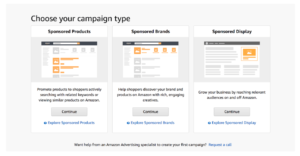
- Select your campaign type
- Choose between Sponsored Products, Sponsored Brands, or Sponsored Display based on your goals.
- Define campaign settings
- Set a campaign name for easy identification.
- Determine the daily budget and campaign duration (specific dates or ongoing).
- Set targeting preferences
- Decide on manual or automatic targeting based on your experience and goals (detailed in Section 4.2).
- Add products
- Select the ASINs (Amazon Standard Identification Numbers) you want to promote.
- Create Ad content
- Upload images, write headlines, and highlight key features of your products (details in Section 4.3).
- Adjust bidding strategy
- Choose between dynamic bids (up-and-down or down-only) or fixed bids based on your strategy.
- Launch the campaign
- Double-check all settings and click Submit for Review. Amazon typically approves campaigns within 72 hours.
Targeting options
Amazon offers several targeting methods to ensure ads reach the most relevant audience. Keyword targeting
-
Use keywords that align with shopper search queries.
-
Types of keyword matches:
- Broad Match: Captures searches with variations and synonyms (e.g., “wireless headphones” matches “Bluetooth headphones”).
- Phrase Match: Targets queries containing the exact phrase (e.g., “noise-canceling headphones”).
- Exact Match: Limits to the exact keyword (e.g., “over-ear headphones”).
-
Pro Tip: Use tools like Amazon’s Keyword Planner to identify high-performing keywords.
Product targeting
-
Target specific ASINs or categories to reach shoppers browsing related products.
-
Use Cases:
- Compete with top-performing competitors by appearing on their product detail pages.
- Cross-sell complementary items (e.g., advertise phone cases on smartphone product pages).
Audience targeting (Sponsored Display only)
-
Re-engage audiences based on their behavior:
- Views Remarketing: Target shoppers who viewed your product but didn’t purchase.
- Purchases Remarketing: Re-engage customers who bought related or complementary items.
-
Custom Segments: Reach shoppers based on interests, life events, or shopping patterns.
Creating content for Ads
Compelling ad content can make a significant difference in click-through rates and conversions.
-
Images:
- Use high-resolution images that clearly showcase your product.
- Include lifestyle imagery to highlight the product in use.
-
Headlines:
- Write concise, benefit-driven headlines.
- Example: “Experience Immersive Sound with Noise-Canceling Headphones.”
Highlight unique selling points (USPs)
- Emphasize what makes your product stand out, such as:
- Durability (e.g., “Built to Last for Outdoor Adventures”).
- Features (e.g., “50-Hour Battery Life for Nonstop Listening”).
- Certifications (e.g., “Certified Organic Ingredients”).
Pro Tip: Use bullet points in product detail pages to reinforce USPs and align ad messaging.
Using automated and manual tools in campaign setup
Amazon provides tools to streamline or customize your campaign setup.
-
Automatic Campaigns:
- Amazon’s algorithm targets relevant keywords and audiences based on your product information.
- Ideal for beginners or initial keyword research.
-
Manual Campaigns:
- Offers greater control over targeting and bid adjustments.
- Recommended for experienced sellers aiming for precision.
-
Hybrid Approach:
- Use automatic campaigns to discover high-performing keywords and audiences, then transfer those insights into manual campaigns for fine-tuning.
Optimization of Amazon Sponsored Ads campaigns
Optimizing your campaigns is crucial to maximizing ROI and staying competitive in Amazon’s marketplace. This section provides detailed strategies and tools to refine your campaigns for better performance.
Key metrics to track performance
Monitoring key metrics allows you to identify strengths and weaknesses in your campaigns and make data-driven decisions. CTR (Click-Through Rate)
-
What It Measures: The percentage of ad impressions that result in clicks.
-
Why It Matters: Indicates how compelling your ads are to potential buyers.
-
How to Improve: Optimize titles, images, and keywords to enhance relevance and appeal.
ACoS (Advertising Cost of Sales)
-
What It Measures: The percentage of sales revenue spent on advertising.
-
Formula: (Ad Spend / Sales Generated) × 100.
-
Why It Matters: Helps evaluate the profitability of your campaigns.
-
How to Improve: Reduce spend on underperforming keywords and focus on high-converting ones.
ROAS (Return on Ad Spend)
-
What It Measures: Revenue generated for every dollar spent on advertising.
-
Formula: Revenue from Ads / Ad Spend.
-
Why It Matters: A high ROAS indicates effective campaigns.
-
How to Improve: Prioritize high-margin products and optimize ad placement.
Adjusting bids and budgets
-
Increase bids for high-performing keywords with strong CTRs and conversions.
-
Lower bids or pause underperforming keywords to optimize ad spend.
-
Adjust daily budgets to avoid running out of impressions during peak shopping hours.
Pro Tip: Use Amazon’s dynamic bid adjustments to boost bids for top-performing placements, such as the top of search results.
Utilizing negative keywords
-
Definition: Keywords that exclude irrelevant or low-performing searches.
-
Benefits:
- Reduces ad spend on unproductive clicks.
- Improves relevance by focusing on high-intent shoppers.
-
Example: If you sell “sports shoes,” exclude terms like “formal shoes.”
Pro Tip: Regularly review Amazon’s Search Term Reports to identify and add non-converting keywords as negatives.
A/B Testing for creatives
-
What It Is: A method to compare two versions of an ad to determine which performs better.
-
Elements to Test:
- Headlines: Which grabs more attention?
- Images: Lifestyle shots vs. standalone product images.
- Calls to Action: “Buy Now” vs. “Learn More.”
-
Expected Outcomes: Identify the combination that delivers the highest CTR and conversions.
Data analysis for informed decisions
-
Use Amazon’s Advertising Reports to analyze:
- Keyword performance and conversions.
- Revenue attributed to ads.
- Impressions and click trends.
-
Adjust campaigns based on:
- Seasonal trends.
- Shifts in consumer behavior.
Ready to master Amazon Sponsored Ads? Sign up for our weekly newsletter to get expert insights, actionable tips, and the latest trends in Amazon advertising. Stay informed and optimize your campaigns for success!
Advanced strategies for Amazon Sponsored Ads
Taking your Amazon Sponsored Ads to the next level involves leveraging advanced tactics to improve efficiency, maximize returns, and outsmart competitors. Here’s how to elevate your campaigns with innovative strategies.
Dynamic bidding strategies
Dynamic bidding allows you to optimize bids automatically based on the likelihood of conversion, ensuring you spend strategically. Up-and-down bidding
-
How It Works: Increases your bid when there’s a higher chance of conversion and lowers it when the likelihood is low.
-
Use Case: Ideal for competitive placements, such as top-of-search results.
-
Pro Tip: Pair this strategy with high-performing keywords to maximize ROI.
Fixed bidding
-
How It Works: Keeps your bid consistent, regardless of conversion probability.
-
Use Case: Suitable for campaigns where precise budget control is essential.
-
Pro Tip: Use fixed bids for campaigns targeting niche, low-competition keywords.
Leveraging advanced targeting capabilities
Maximize audience reach and engagement by using sophisticated targeting options. Behavioral and contextual targeting
-
Behavioral Targeting: Targets shoppers based on past purchase or browsing behavior.
-
Contextual Targeting: Targets based on product categories or related items.
-
Combination Benefits: Offers precise targeting by aligning shopper intent with product relevance.
-
Pro Tip: Combine both types to target audiences most likely to convert.
Introduction to Amazon DSP
-
What It Is: Amazon’s Demand-Side Platform allows for advanced audience segmentation.
-
Capabilities:
- Retarget audiences on and off Amazon.
- Use first-party data for granular targeting.
-
Pro Tip: Use Amazon DSP to re-engage users who viewed your product but didn’t purchase.
Maximizing opportunities during high-demand events
Take advantage of shopping events like Prime Day, Black Friday, and Cyber Monday to drive sales.
-
Preparation Tips:
- Increase budgets to sustain higher traffic volumes.
- Optimize listings with holiday-specific keywords, e.g., “Prime Day Deals.”
- Run promotional campaigns with discounts or bundles.
-
During the Event:
- Monitor campaigns closely to adjust bids based on performance.
- Focus on top-performing products with high conversion rates.
-
Post-Event Strategy:
- Use retargeting ads to engage shoppers who browsed but didn’t buy.
- Analyze event performance metrics to refine future campaigns.
Common challenges and solutions in Amazon Sponsored Ads
Despite their effectiveness, running Amazon Sponsored Ads comes with challenges. Addressing these obstacles can help you optimize campaigns and ensure better performance. Here’s a look at the most common issues and actionable solutions:
Managing high CPC costs
High cost-per-click (CPC) rates can quickly eat into your budget, especially in competitive niches. Challenges:
-
Intense competition for popular keywords.
-
Inefficient bidding strategies leading to overspending.
Solutions:
-
Refine Keywords: Focus on long-tail keywords that are less competitive but highly relevant.
-
Set Bid Limits: Use bid caps to prevent excessive spending on low-converting clicks.
-
Optimize Listings: Improve product detail pages to increase conversion rates, justifying higher CPCs.
-
Monitor Performance: Regularly analyze Search Term Reports to identify high-cost, low-performing keywords and adjust bids accordingly.
Avoiding Ad fatigue
Ad fatigue occurs when shoppers repeatedly see the same ad, reducing engagement and click-through rates. Challenges:
-
Declining CTR over time.
-
Decreased ad relevance due to static content.
Solutions:
-
Update Creatives: Refresh images, headlines, and ad copy regularly to maintain interest.
-
A/B Testing: Experiment with different creatives to identify what resonates best with your audience.
-
Rotate Ads: Use multiple ad variations to avoid overexposing a single design.
Improving low conversion rates
Driving traffic is important, but if it doesn’t convert to sales, your ad spend isn’t yielding returns. Challenges:
-
Poor product detail pages leading to cart abandonment.
-
Targeting irrelevant audiences.
Solutions:
-
Enhance Product Listings: Use high-quality images, optimize descriptions with relevant keywords, and include bullet points highlighting key features.
-
Use Negative Keywords: Exclude irrelevant search terms to refine audience targeting.
-
Leverage Retargeting: Re-engage users who viewed your product but didn’t complete a purchase with Sponsored Display ads.
Learning from case studies
Real-life examples can offer valuable insights to overcome challenges and implement effective strategies. Case study 1: A fitness brand struggled with high CPCs for “yoga mat.” By targeting long-tail keywords like “eco-friendly yoga mat” and using dynamic bidding, they reduced CPC by 30% while increasing conversions. Case study 2: A home décor seller faced low conversion rates due to poor listing optimization. After updating product images, titles, and bullet points, they saw a 45% increase in sales.
Real-Life success stories with Amazon Sponsored Ads
Exploring real-world examples highlights the potential of Amazon Sponsored Ads to drive success across different objectives. These case studies demonstrate how various brands have leveraged Sponsored Products, Sponsored Brands, and Sponsored Display to achieve their marketing goals.
How a home appliance brand boosted visibility with Sponsored Products
Challenge: A home appliance brand wanted to increase the visibility of its new portable air purifier in a highly competitive category. Strategy:
-
Keyword Targeting: Focused on highly relevant keywords such as “compact air purifier” and “portable air cleaner.”
-
Manual Campaigns: Combined broad, phrase, and exact match keywords to balance traffic volume and relevance.
-
Enhanced Listings: Optimized product detail pages with high-quality images, detailed descriptions, and customer reviews.
Results:
-
40% increase in product visibility.
-
25% growth in sales within two months.
-
Lower ACoS by refining bids for high-converting keywords.
Using Sponsored Brands to enhance branding and sales
Challenge: A fashion retailer sought to create brand awareness and drive traffic to its Amazon Store for a seasonal jacket collection. Strategy:
-
Creative Content: Developed a Sponsored Brands ad with a compelling headline, logo, and visually appealing lifestyle images of the collection.
-
Store Spotlight: Directed traffic to their Amazon Store, showcasing the collection across subcategories.
-
Keyword Targeting: Focused on both branded and non-branded keywords like “winter jackets” and “lightweight outerwear.”
Results:
-
50% increase in Amazon Store visits during the campaign.
-
20% growth in overall jacket sales.
-
Higher brand recall as evidenced by increased searches for the retailer’s name.
Driving conversions with retargeting in Sponsored Display
Challenge: An electronics accessories brand struggled to convert users who browsed their phone cases but didn’t complete a purchase. Strategy:
-
Views Remarketing: Used Sponsored Display ads to retarget users who viewed their product listings in the past 30 days.
-
Dynamic Ads: Featured images, star ratings, and price updates dynamically based on user interactions.
-
Incentives: Offered limited-time discounts visible in the ads to encourage conversions.
Results:
-
30% increase in conversion rates.
-
Recovered abandoned purchases by re-engaging users with personalized ads.
-
Boosted customer lifetime value by cross-selling complementary products.
Key takeaways from success stories
- Relevance is Critical: Tailored targeting and keyword selection ensure your ads reach the right audience.
- Creative Content Matters: High-quality visuals and engaging headlines significantly impact click-through and conversion rates.
- Retargeting Works: Sponsored Display ads effectively re-engage users who didn’t convert initially.
Tools and platforms to optimize Amazon Sponsored Ads
Effectively managing Amazon Sponsored Ads requires more than just a basic understanding of the platform. Leveraging tools and platforms can significantly enhance campaign performance, streamline processes, and maximize ROI. Below is an overview of essential tools and platforms to consider.
Internal tools provided by Amazon
Amazon offers built-in tools to help advertisers optimize their campaigns and analyze performance effectively. Search Term Reports
-
Purpose: Identify which keywords and search terms drive traffic and conversions.
-
How to Use:
- Identify high-performing search terms and allocate higher bids.
- Add low-converting terms to the negative keywords list.
Bulk Operations
-
Purpose: Manage large-scale campaigns efficiently.
-
How to Use:
- Download a bulk spreadsheet to modify bids, keywords, and budgets across multiple campaigns simultaneously.
- Ideal for sellers managing hundreds of ASINs or multiple ad campaigns.
Campaign Manager
-
Purpose: Track key metrics like CTR, ACoS, and ROAS in real-time.
-
How to Use:
- Monitor ad performance to identify trends.
- Adjust bids and budgets directly from the dashboard.
Automating campaigns for efficiency
Automation tools allow advertisers to scale campaigns without losing control over key elements. Automated Bid Optimization
-
Adjust bids in real-time based on campaign performance.
-
Example: Tools like Epinium automatically lower bids for low-performing keywords and increase bids for high-converting ones.
Dynamic Budget Allocation
-
Allocate budgets to the most profitable campaigns or products dynamically.
-
Example: Use software to pause underperforming campaigns and redistribute funds to higher-performing ones.
Performance Alerts and Reporting
-
Get real-time alerts for sudden performance changes.
-
Generate automated reports to track KPIs like CTR, ACoS, and conversion rates.
Benefits of leveraging tools and platforms
- Time Savings: Automating repetitive tasks like bid adjustments and keyword research allows sellers to focus on strategy.
- Improved Accuracy: Advanced algorithms analyze data at a scale and precision that manual methods can’t match.
- Scalability: Easily manage campaigns for extensive product catalogs without compromising performance.
- Better Insights: Data visualization and performance reports simplify decision-making.
Optimizing Sponsored Ads with Epinium
Elevate your campaigns with Epinium Epinium’s AI-powered tools automate and optimize your Sponsored Ads campaigns. Save time, reduce costs, and maximize ROI with intelligent keyword research, bid adjustments, and performance analytics. Try Epinium for free and unlock your advertising potential today!
FAQ: Amazon Sponsored Ads
What are the three main types of Amazon Sponsored Ads?
Sponsored Products promote individual product listings in search results and product detail pages, Sponsored Brands are banner-style ads showcasing a logo, headline, and up to three products at the top of search results, and Sponsored Display retargets audiences based on browsing behavior both on and off Amazon.
How does the cost-per-click (CPC) model work for Sponsored Ads?
Sponsored Ads run on a pay-per-click auction basis, meaning advertisers are only charged when a shopper clicks the ad, not for impressions. The cost per click is determined through an auction, so if you set a maximum bid of $1.50 and win, you may pay slightly less depending on competition.
What budget should I start with when testing a new campaign?
A starting daily budget of $10–$20 is common for testing new campaigns. From there, calculate a target ACoS based on your product’s profit margin — for example, a 30% profit margin should aim for an ACoS of 30% or lower — and scale budgets based on performance.
How do negative keywords help reduce wasted ad spend?
Negative keywords exclude irrelevant or non-converting search terms from triggering your ads. For example, a seller of running shoes would add “formal shoes” as a negative keyword to prevent ads from showing in irrelevant searches, reducing spend on unproductive clicks.
What results did the case studies in this guide show from optimizing Sponsored Ads?
A kitchenware brand targeting “non-stick frying pan” saw a 40% increase in visibility and 25% sales growth within 30 days. A fashion retailer using Sponsored Brands for a jacket collection achieved a 50% increase in Brand Store visits and 20% growth in jacket sales. A fitness brand reduced CPC by 30% by shifting to long-tail keywords like “eco-friendly yoga mat” combined with dynamic bidding.